Wonyoung Makina FLUX
makinaflux_wonyoung_v1.2.safetensors LORA / Flux.1 D
- Model Name
- Wonyoung Makina FLUX
- Version
- v1.0
- Creator
- Makina69
- Size
- 73.14 MB
- Downloads
- 1,753
- BTIH
- 8E7E21E19DCF3AAC2F586438899CF5B864E40E12
- BTMH
- 2EBBD20EA4021CFE2163463352F25B444C86B868CC4B6014855A0A61BE466BE0
- SHA256
- 5F2EE27D70796C9FDBB04C4DCDF64B5739D8F72F13FBA33630A996E524F34225
- Upload Date
- about a year ago
- Uploader
- CivitasBay.org
- Status
- 4 Seeders1 Peers
NOTE: People asking me why I need buzz points. Answer is I need as many civitai buzz possible to run multiple flux tests. One run cost around 2600 buzz, and usually per model I need to run like 2-3 times to get decent enough result. In the future once I know the optimal settings I will stop asking for buzz donations from Early Access program.
Anyway in short, more buzz = more loras, so gimme gimme now x2.
Support me at: https://ko-fi.com/makina69
Quick tips on the easiest way to start your Flux journey from my experience so far:
Forge - this has the familiar WebUI A1111 style if you just can't be bothered to learn comfy.
github.com/lllyasviel/stable-diffusion-webui-forge/releases/download/latest/webui_forge_cu121_torch231.7z
To unzip 7z file: www.7zip.orgStart > Command Prompt as Administrator then go to the unzipped folder and run update.bat then
run run.bat to start the webui.Get the checkpoint flux.1d fp8:
huggingface.co/lllyasviel/flux1_dev/blob/main/flux1-dev-fp8.safetensorsClip_l & t5xxl_fp8_e4m3fn & put them in /models/textencoders of your Forge directory
huggingface.co/comfyanonymous/flux_text_encoders/tree/mainPut this in /models/vae: huggingface.co/black-forest-labs/FLUX.1-schnell/resolve/main/ae.safetensors
Realism Lora, put in /models/lora - civitai.com/models/631986/xlabs-flux-realism-lora
This is optional, you can use your own favourite upscaler. ESRGAN/4x_NMKD-Superscale-SP_178000_G.pth · uwg/upscaler at main (huggingface.co)
Put in /models/ESRGAN
Below is the usual settings I use: (Use LMS for best skin texture)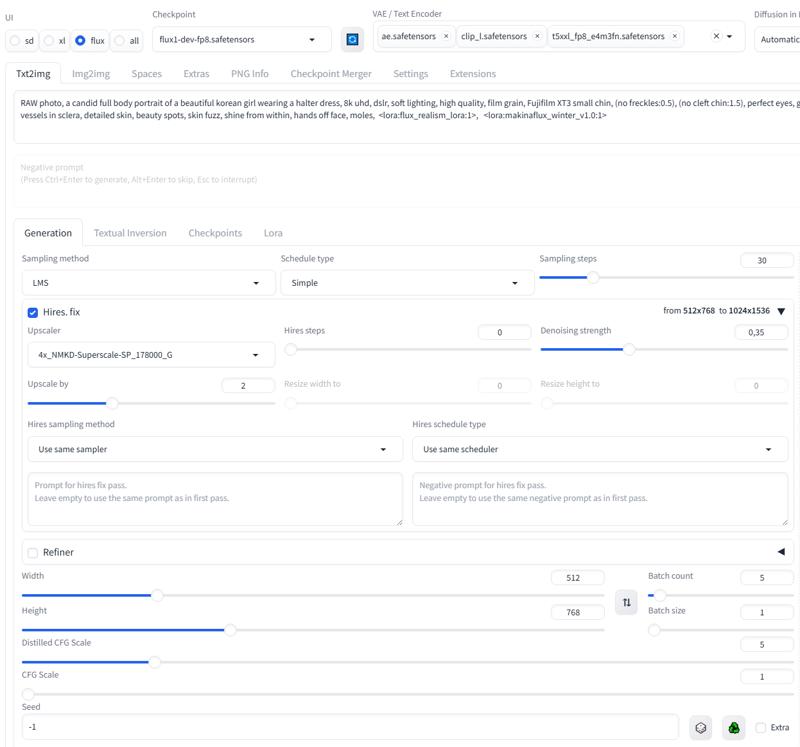





- udp://tracker.opentrackr.org:1337/announce
- udp://open.demonii.com:1337/announce
- udp://open.stealth.si:80/announce
- udp://tracker.torrent.eu.org:451/announce
- udp://tracker.qu.ax:6969/announce
- udp://tracker.bittor.pw:1337/announce