League of Legends / LoL Splash Art | Rouwei V-Pred & Illustrious XL 0.1 | Style LoRA
L0LSPL4SH_IllustriousXLv01.safetensors LORA / Illustrious
- Model Name
- League of Legends / LoL Splash Art | Rouwei V-Pred & Illustrious XL 0.1 | Style LoRA
- Version
- v1.0 | Illustrious
- Creator
- RC0N
- Size
- 734.42 MB
- Downloads
- 4,344
- Trigger
- L0LSPL4SH
- BTIH
- FF5C37E02082AD631DAE7A165AB154428CE011E5
- BTMH
- 9B352024485835A2E21E27AD6E9A8C2151F2DF57F57B35C2CF217A5AF55EB247
- SHA256
- E45389FD0665C9EB8FE005269C68BA6D503837502E5D1037FFD473332C8EE3AD
- Upload Date
- about a year ago
- Uploader
- CivitasBay.org
- Status
- Not currently seeded — request it0 Seeders0 Peers
2.0 | Rouwei 0.8 V-Pred
Important: This lora is not compatible with illustrious and any derivative models such as hassakuxl, WAI-illustrious etc. If you want to use those models, use V 1.0 of this lora.
more info to come. The workflow archive has .txt files with it that list all the unique tokens.
base model: https://civarchive.com/models/950531?modelVersionId=1882934
workflow: https://civarchive.com/models/2030179?modelVersionId=2297640
As always, resolution is king. the higher you're able to push the resolution with subtle highres fix passes, the more detail you're gonna get. Adetailer is pretty much required, faces get very jumbled and messy otherwise, nothing i could do about that unfortunately.
Rouwei has proven to be extremely good at soaking up concepts with only few samples, skinlines/sets are now much stronger triggers, and you hardly need to prompt anything aside from the skinline/set trigger to get something very close. As a result, prompting is much, much easier now; you can really just put 1girl in the main prompt and change the skinline, and hit go, if you so desire. Additionally, we get the added benefit of a seriously well-crafted V-Pred model, with rich, deep colors and amazing contrast.
Stylistically, the details are more delicate and softer, extremely high quality effects are now much more stable than in previous versions.
prompting format (also embedded in the workflow as a note next to the prompt input boxes):
the format generally is as follows:
L0LSPL4SH, <quality_tags>, <character_name>, <skin_name> <character_name>, <skin_series_name>, <artists/studios>, <year>, <time_period>, <general tags/natlang>Recommended negative prompt is:
(worst quality:1.25), (bad quality:1.1), (average quality:0.8)A good starting point would be something like:
L0LSPL4SH, masterpiece, best quality, Girl, Original Girl, Original, West Studio, Kudos Productions, 2024, 2025, new, newesthere, you could substitute "Original" with any skin name and any skinline/set, and you would get a completely different image, akin to the skin/set.
1.0 | Illustrious:
Create super detailed artworks in the style of League of Legends splash art.
03/10/2024 edit: Removed CivitAI "Create" button / generation service compat, because none of the Illustrious-XL models are available for use on the on-site generator (temporaily?).
TL;DR Recommendations
Base model: Illustrious-XL SmoothFT-SPO
Positive prompt template:
best quality, masterpiece \(quality\), L0LSPL4SH, year2024, year2023, West Studio, sixmorevodka, {prompt}Negative prompt template:
(low quality, worst quality:1.2), year2011, year2010, year2009, year2008, legacy, {prompt}CFG: 6.5
Sampler: DPM++ 2M
Scheduler: Karras
Steps: 28
Resolution: 832x1216 (try some different resolutions, it can handle wide format very well)
Highres Fix: 1.75x using any good upscaler like ESRGAN_4x, denoising 0.6 or less
Adetailer: 1024x1024 res, 0.5 denoise
Full Recommendations
Continuing from above, I recommend these parameters on top.
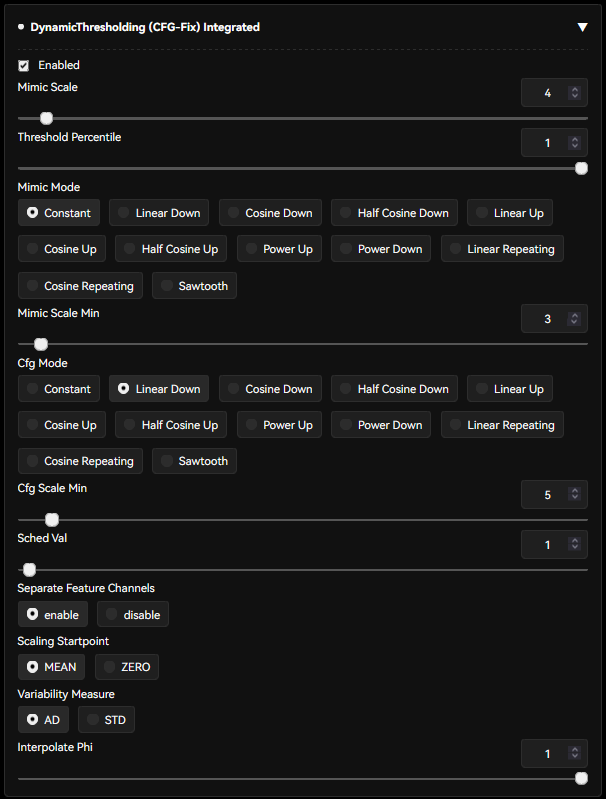
Dynamic Thresholding
if you're on Forge/reForge, you already have this. If not, you can get it here
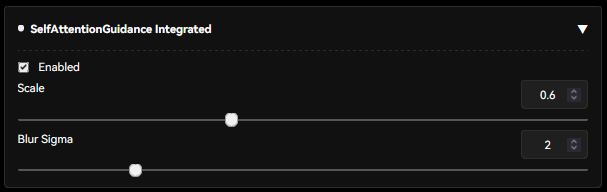
 Self Attention Guidance
Forge/reForge users have this. Others can get it here.
small warning: this one comes with a small 10% generation speed decrease. Worth it for the stability it gives imho.
Special/Custom Tags
you can read all about the dataset specifics on the old Pony model page here, all the same rules apply. In fact, i fucked up during dataset preparation and accidentally left some Score_X tags in the dataset, though seemingly it doesn't matter much at all.
For specific skinlines, try combining 1girl/character tag with whatever skinline it is, plus whatever skin name it would be. For example "Blood Moon, Blood Moon 1girl", or "Anima Squad, Battle Bunny Irelia \(league of legends\)". All the same rules of using any general anime finetune apply. Elaborate in the prompt, and you are more likely to get stable/good gens than just hitting the randomize button 200 times (though that works too if you're feeling uninspired).
- udp://tracker.opentrackr.org:1337/announce
- udp://open.demonii.com:1337/announce
- udp://open.stealth.si:80/announce
- udp://tracker.torrent.eu.org:451/announce
- udp://tracker.qu.ax:6969/announce
- udp://tracker.bittor.pw:1337/announce